
We are excited to share that our Residential Time of Use (TOU) rate is now available to you. We’ve also launched our new online tool, Energy Insights, to help you explore your energy use and compare your rate options.
Here’s everything you need to know.
How the TOU rate works
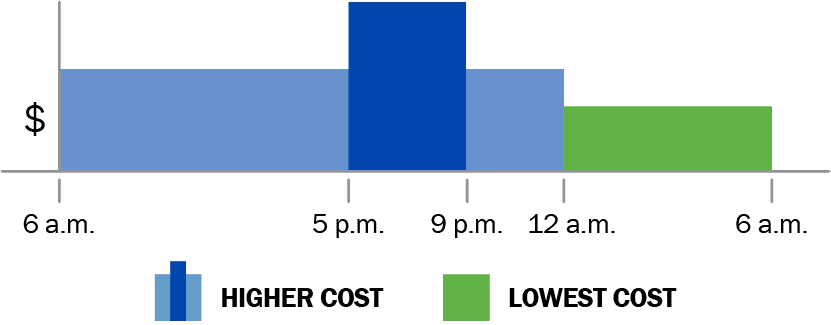
With TOU, when you use electricity affects how much you pay. Electricity costs more during peak hours (from 5 to 9 PM), when demand is highest, but it will cost less during other times.
By shifting some of your electricity use to off-peak hours, you can reduce your bill. Plus, you’ll help make our power grid more efficient.
Our TOU rate has three pricing periods:
- Peak hours (most expensive): 5 to 9 PM, Monday through Saturday (excluding observed holidays).
- Mid-peak hours (moderate pricing): 6 AM to 5PM and 9 PM to midnight, Monday through Saturday. On Sundays and holidays, mid-peak pricing lasts all day (6 AM to midnight).
- Off-peak hours (least expensive): Midnight to 6 AM, every day.
Learn more about TOU rates on our Residential Rates page.
Why is City Light introducing a TOU rate?
The TOU rate:
- Gives you more choice and control over your bill.
- Helps reduce system costs by shifting use away from higher-cost peak times.
- Supports our clean energy goals.
When more people shift some electricity use to off-peak times, it lowers demand on the electrical grid. That reduces strain, helping us avoid costly infrastructure upgrades. It also makes it easier to meet our energy needs with our hydropower dams and other renewable resources. TOU pricing is an important step toward a more reliable and sustainable energy future.
How you can get started
Getting started is easy! Follow these steps:
- Go to the Utility Services Website and log into your Utility Services profile. If you don’t have a profile yet, create one by clicking “Register Now.”
- Once logged into your profile, you’ll land on the Account Overview page. On the left, click the service address of the account you want to manage. If you have multiple service addresses, be sure to click the correct address.
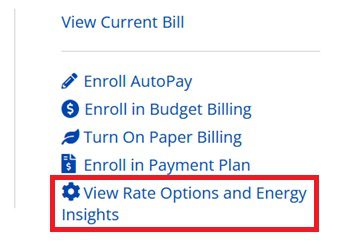
- On the account page, you’ll see your recent bill summary, and a menu bar on the right. Click “View Rate Options and Energy Insights.” This opens the new Energy Insights tool.
Navigating Energy Insights
Energy Insights shows personalized insights into how you use energy. Inside Energy Insights you can:
- Compare rate options. See personalized bill estimates for each available rate to easily compare costs.
- Further personalize your bill estimates with a quick quiz. See how changing your energy habits or when you use energy could change your bill at different rates.
- Sign up for a new rate. If TOU looks like a good fit for your home, you can sign up. For more information about how to sign up, visit our residential TOU Rate page.
- Compare past bills. Look at recent bills side by side to better understand how your use changes over time.
- See a bill forecast. Check how your current bill is trending before your billing period closes.
- Track your energy use and bills. View recent usage and billing data so you can explore trends.
Learn more
Are you interested in seeing how TOU could work for your household? Explore Energy Insights and consider what changes you can make to your energy habits! Read other posts on our blog to learn how to save money with TOU and explore the benefits of TOU with customer stories.